

If you’ve got a Sierra LSV and it’s acting a little funky, don’t sweat it. These carts are absolute beasts, but like any electric ride, they’ve got their quirks. Today, we’re breaking down the real-world troubleshooting stuff every Sierra golf cart owner should know, plus a big section of FAQs to make life 10× easier.
Let’s dive into the good stuff.
What Makes Sierra Golf Carts Stand Out?
Sierra golf carts exploded in popularity when they launched in 2024—and honestly, it’s not surprising at all. These things are built like tanks but drive like butter. Whether you’re cruising the neighborhood or rolling around a campground, the build quality is the first thing people notice.
Why Sierra LSVs Became So Popular in 2024
Sierra didn’t roll these out quietly—they came in hot with luxury features that other brands make you pay extra for. Hybrid or aluminum frames, super clean interiors, powerful lithium batteries, and a touchscreen that feels like a mini car dashboard.
Why People Love Their Sierra Carts
- Durable AF
- Easy to maintain
- Affordable considering what you get
- Great battery life
- Tons of features that come standard
They’re basically the “family SUV” of golf carts.
The Most Common Sierra Golf Cart Issues (And How to Fix Them)
Let’s skip the fluff and jump straight into the fixes.
Screen Too Dark or Too Bright? (Screen Brightness Fix)
If your touchscreen looks like it went into vampire mode or straight-up blinding sunshine mode, here’s the quick fix:
👉 Tap the sun icon in the top-right corner of the screen.
- Half sun = dimmer
- Full sun = brighter
That’s it. No hidden menus. No weird settings. Easy win.
AM/FM Radio Not Working or Not Scanning Stations
If your music isn’t hitting, here’s how to get the radio behaving:
- Tap the AM/FM icon on the home page.
- Hit the magnifying glass so the system can scan local stations.
- You get 12 preset slots on the left side.
- Tap the little Wi-Fi-looking icon to cycle through presets.
If you still get static, it’s usually a weak local signal—not the Sierra system.
Settings Menu Confusion: What You Can Actually Change
The Settings area seems huge, but most of it is meant for Sierra dealers and tech support.
YOU can change:
- Language
- KM/MPH
- Clock
Everything else? Mostly diagnostics.
Car Diagnostics Not Showing Anything? Here’s Why
People miss this step all the time.
To view real diagnostics:
- Go to Basic.
- Turn Car Info = ON.
- Go back to Car Diagnostics.
Boom—now the system actually shows updated data.
What Does “0 A” Mean on the Dash? (Motor Amps Explained)
That little 0 A icon in the bottom-right corner?
That’s motor amps.
- If the cart is still → amps stay low.
- If you’re accelerating or going uphill → amps climb.
Totally normal.
When Your Cart Feels Weak or Sluggish
If the cart feels like it woke up on the wrong side of the battery pack:
- Check battery charge
- Check uphill load
- Check terrain resistance (grass, sand, wet ground)
- Make sure the brakes aren’t dragging
If amps are sky-high constantly, you might need dealer diagnostics.
When Your Sierra Cart Won’t Turn On At All
Before you panic:
- Check the main power switch
- Check the battery connection
- Make sure your lithium battery breaker isn’t tripped
- Give the touchscreen 10–20 seconds to boot
- Try switching between Forward / Reverse
90% of the time, it’s a loose cable or an off battery switch.
Understanding Sierra LSV Technology (In Plain English)
Sierra didn’t just slap random parts together. Here’s what makes the tech so solid.
Lithium Battery Advantages
- Faster charging
- Longer lifespan
- Less maintenance
- Holds power better under load
Basically: better everything.
Aluminum & Hybrid Frames Explained
These frames don’t rust like steel and they keep your cart lighter, faster, and safer. More durability = fewer headaches later.
Preventive Maintenance Tips to Keep Your Sierra Cart Happy
Daily/Weekly Checks
Just a quick glance at:
- Battery level
- Tires
- Brakes
- Touchscreen alerts
Long-Term Care
- Store indoors when possible
- Keep battery terminals clean
- Don’t drain lithium batteries to zero
- Let the cart fully shut down before charging
Do this and your Sierra cart will last years.
Sierra Cart Buying Tips
If you’re looking to upgrade, customize, or buy another Sierra cart, do yourself a favor and check out:
You’ll find some killer builds—especially good if you want luxury features without paying “luxury brand” prices.
-
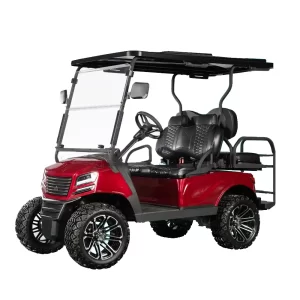
Sierra AX1 Golf Cart
Price range: $11,550.00 through $11,995.00 -
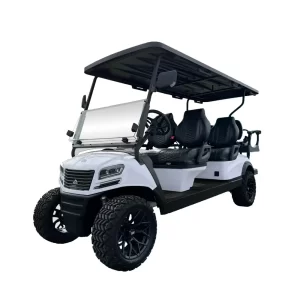
Sierra AX3 Golf Cart
$16,295.00 -
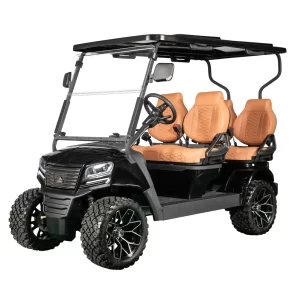
Sierra AX4 Golf Cart
Price range: $12,995.00 through $13,850.00
Sierra Golf Cart FAQ’s
Usually low battery voltage or the screen booting up. Give it 10–20 seconds and make sure your battery is well-charged.
Tap the magnifying glass icon to rescan stations. If the signal is weak where you live, the radio can only do so much.
Absolutely. That’s what most people buy them for. Smooth, comfy, and reliable.
Yes—most models do. And Sierra’s lithium packs are high-quality and long-lasting.
Check drive mode, battery charge, and terrain. If amps are maxing out, you may need diagnostics.
If the diagnostics screen shows unusual data or your cart loses power under light load, it’s worth calling a dealer.
Sierra golf carts are rock-solid machines, but knowing the little troubleshooting tricks keeps them running like a dream. From screen settings to diagnostics to motor amp info, now you’ve got the cheat sheet to handle almost anything your Sierra cart throws at you.
And if you ever want to browse new Sierra LSVs, don’t forget to check out:
👉 Sierra Golf Carts for Sale in Colorado


